You see a form but do not know what data the application actually receives.
Connect a user's action to a request and response.
Identify the parameter, account and resource. Perform a normal operation before changing the input for an attack attempt.
See the working demo ↓A screenshot — the working demo is belowPolish edition · Waitlist
Web application security
Stop guessing what a payload does. In 132 labs, learn why vulnerabilities occur, change requests and compare results. A tutor and narration guide you through the example, then you test your own variations. Everything runs in your browser, with no installation.
PLN 790planned price including tax
In your browser · No installation · Tutor and narration
Look inside
The demo includes a complete lab
Full course: Web Security PRO
We will notify you when the full course launches. No obligation to buy.
Counts describe the program's current source material. Test variants include attacks, controls and models, not only exploits. Different types of material are not added together.
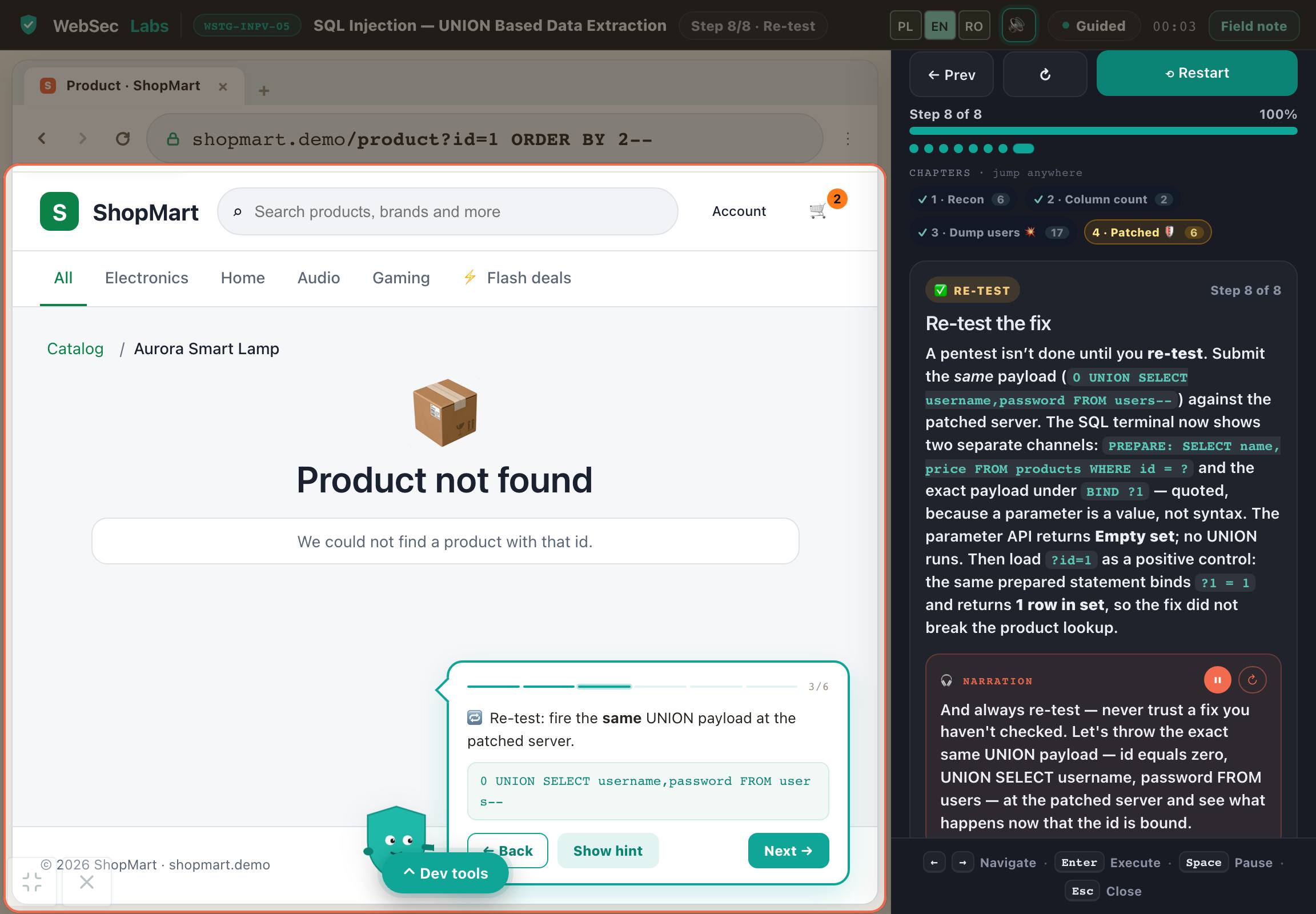
This is the complete UNION SQL injection lab: 31 tutor steps, 8 stages and 18 Sandbox variations. Trace a product parameter from the HTTP request to the SQL query, see the exposed data and test a parameterized fix.
One full WSTG lab with Sandbox in its original exercise environment. This is 1 of the first edition's 132 labs. Separate professional-practice modules are not part of this offer.
Open your browser. Start learning.
Do not spend your first evening configuring an environment. The application, tools and task context are in one place. You do not need Docker, a VPN, a virtual machine or paid software.
A virtual tutor walks you through the example and highlights important parts of the application, code or tool. Connect the instruction to what is happening on screen.
Narration explains the mechanism, decision and result. Pause the guidance, return to an earlier step and work through it at your own pace.
Take over in the exercise: change data, run a test or make a decision. Compare the result and improve your solution using the explanation.
One environment, without switching between a video and a local installation. Tools fit the topic: from HTTP requests and code to a terminal, calculator or document. Practice in simulators and prepared cases, without attacking other people's systems.
What will you be able to do?
This is not about getting through another screen. Learn to identify inputs, choose a test and explain why it changed the application's behavior.
You see a form but do not know what data the application actually receives.
Identify the parameter, account and resource. Perform a normal operation before changing the input for an attack attempt.
You know the flaw's name or a payload but cannot tell whether the result proves anything.
Compare normal behavior with an unauthorized-access attempt. Record reproduction conditions, the actual effect and the limits of your conclusion.
After changing a protection, you only check whether the error disappears.
In the lab's protected version, verify both that the unauthorized operation is blocked and that an authorized user retains access.
Use this way of thinking in further AppSec learning and authorized testing: distinguish observation from assumption and identify conditions worth checking. The first edition develops technical skills; it does not replace preparation for managing an entire engagement.
Connect each skill to a concrete work product. Return to explanations while you practice.
Suggested learning sequence
Start with one case and understand its result. Then explore more application mechanisms and attack variations. The catalog is a source of practice, not a checklist to finish in one weekend.
Full UNION SQL injection demo
Connect the product parameter, HTTP request and SQL query. Compare a normal result with an attack attempt, then test the fix.
Authorization and data isolation
Change one identifier, compare responses and explain whether another user's data was exposed.
Authentication and sessions
Test how the application identifies an account, maintains a session and ends access.
SQL injection and XSS
Connect input data to its interpretation in a query or browser.
Exercise variations and control tests
Verify the expected block and a legitimate operation. Then choose another vulnerability class from the catalog.
Basic IT knowledge and familiarity with web applications will help. Code examples require basic HTML and JavaScript. Start with the free demo to check the level and learning experience. You do not need to buy a separate specialist course.
A syllabus backed by materials
See what makes up the syllabus: lessons, explanations, examples and exercises. The figures below describe different types of materials.
The figures describe the current materials. Demonstration steps, examples and tasks are different units, not hours of video or counts of unique vulnerabilities.
132 technical labs
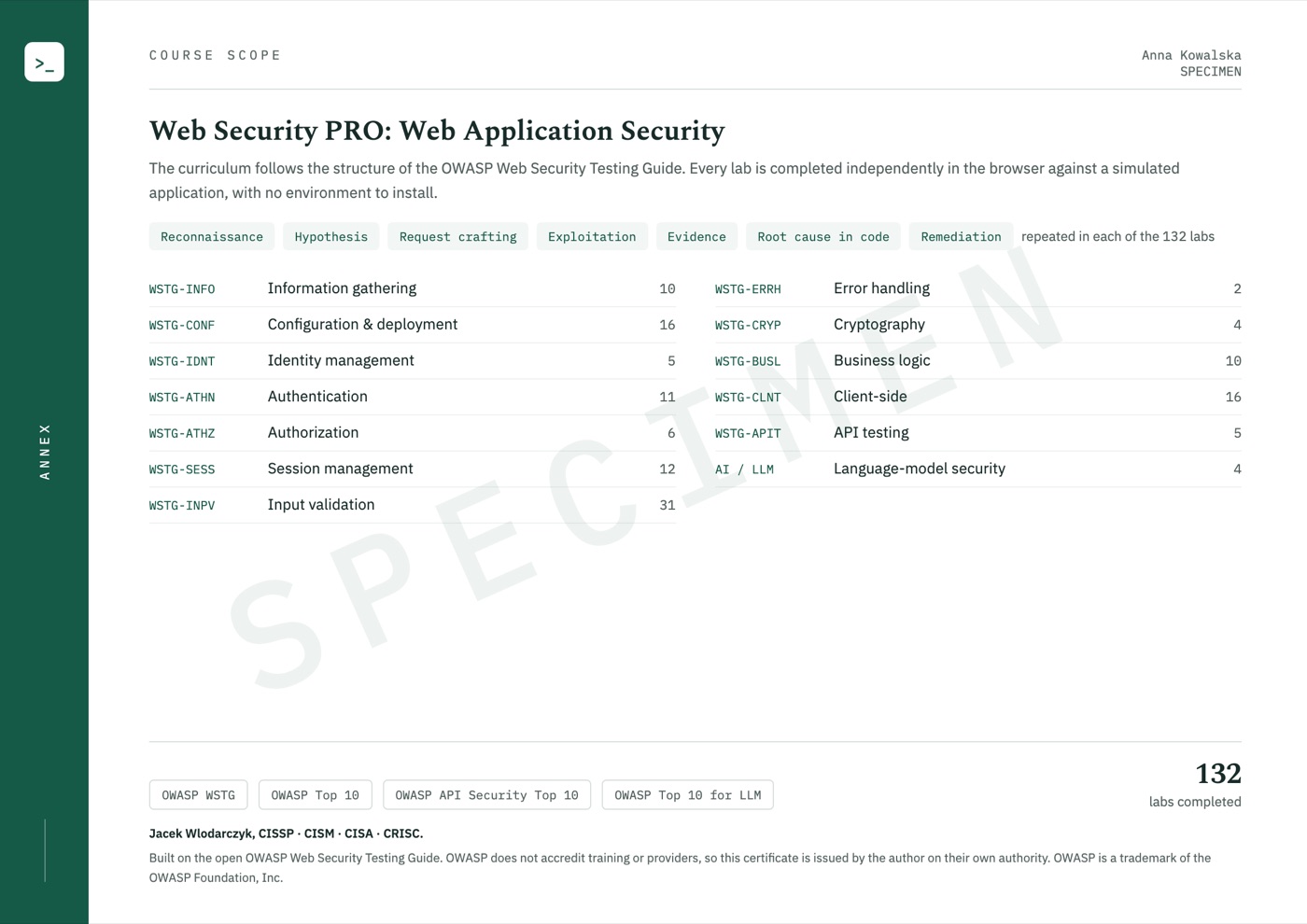
The syllabus covers all 12 application-testing areas in WSTG 4.2, from reconnaissance to APIs. We extend it with further protocol, token, cache and AI-application scenarios. Every lab topic is listed below.
Lab topics
Lab topics
Lab topics
Lab topics
Lab topics
Lab topics
Lab topics
Lab topics
Lab topics
Lab topics
Lab topics
Lab topics
Original curriculum extension
Try another term, such as passwords, cookies or API.
132 is the number of our labs, not the number of official OWASP tests. WSTG 4.2 organizes the topic coverage, with original extensions adding to it. Subtopics include demonstrations, tasks and models, depending on the mechanism.
Know where to look next
Notes connect the topic to a test description and remediation guidance. Links help you go deeper, but you do not need to leave the platform to complete our exercises.
From login bypass to the cause in the query and parameterization.
From reading another user's invoice to server-side authorization checks.
From a user-supplied URL to unintended access to a service.
These are examples of topic references, not a partnership or official OWASP or PortSwigger training. Access to external services is not included in the offer.
Join the waitlistEntry point
Available in Polish and English — you can switch language at any time. Command names, code snippets and standard identifiers remain in their original form.
How you learn
The tutor walks through an example and explains each decision. In the exercise, return to the context, check the result and improve your answer.
Goal, constraints and inputs. Know what you are testing and why.
Watch a demonstration with tutor commentary, step by step.
Work with data, a tool or a scenario. Compare the result with your expectation.
Justify your decision and understand its limitations. Return to anything that needs improvement.
Exercises use simulators and selected mechanisms that run in the browser. They do not require attacking other people's systems.
First-edition syllabus
From access control and sessions to injection and application logic flaws. Each group leads to specific labs you can repeat at your own pace.
132 labs cover WSTG topics and original extensions. This counts exercises, not official objectives or OWASP accreditation. Separate professional-practice modules are not part of this edition.
Each topic includes a skill and a concrete exercise outcome.
I want to join the listAnalyze public information, application metadata, headers, supporting files and technology clues. Test exposed backups, unnecessary HTTP methods, server configuration and improper access to deployment resources. Use the results to choose further tests.
Tutor-guided exercise
Examine registration, account enumeration, login, lockouts and account recovery. Analyze alternative authentication channels and additional login factors. In each case, connect form behavior to the server response and account state.
Tutor-guided exercise
Compare users' and roles' access to the same objects and administrative functions. Trace tenant isolation, identifier manipulation and file access control. Prepare a test that rejects an unauthorized operation and a control test in which an authorized user can still work.
Tutor-guided exercise
Work through session creation, privilege changes, identifier rotation, expiry and logout. Compare cookie attributes, readability and transmission in different contexts. Practice session fixation and CSRF scenarios and select server-side controls.
Tutor-guided exercise
Explore SQL injection, command injection and other unsafe interpretations of data, plus file-handling and service-request issues. Compare valid input with a deliberate change, read the effect and analyze the fix. Choose tests based on where the data is used.
Tutor-guided exercise
See when an error message reveals application structure, data or backend details. Analyze transport protection and cryptographic misuse. Connect observed behavior to the missing security property and an appropriate recommendation.
Case analysis
Trace processes in which valid requests produce an invalid business outcome. Test step order, repeated operations, limits and skipped decisions. Describe the business rule that must also hold outside the user interface.
Tutor-guided exercise
Analyze XSS, DOM operations, data sources, cross-window messaging and local application state. Choose a test for the HTML, script or URL context. Compare encoding, safe APIs and browser protections, also checking legitimate functionality after the fix.
Tutor-guided exercise
Extend your practice with original API, OAuth and JWT cases, caching behavior, protocol boundaries and AI/LLM applications. Apply the familiar pattern: identify input, run a controlled test, observe and fix. This supplements the WSTG 4.2-linked labs; it is not an additional official OWASP chapter.
Tutor-guided exercise
In practice
Each case has context, a concrete action and an outcome. The goal is not to memorize a command but to understand why the result changed.
Compare reading your own resource with another user's. Change one parameter and trace the application's decision. In the protected version, verify access denial and legitimate operation for the owner's account.
Work productAn explanation of the IDOR cause and tests showing the difference between vulnerable and protected versions.
In SQL injection labs, compare normal data with prepared attack variations. Check the response and trace why the application interpreted the data differently from the author's intention.
Work productIdentification of the injection mechanism from changed input and the observed result.
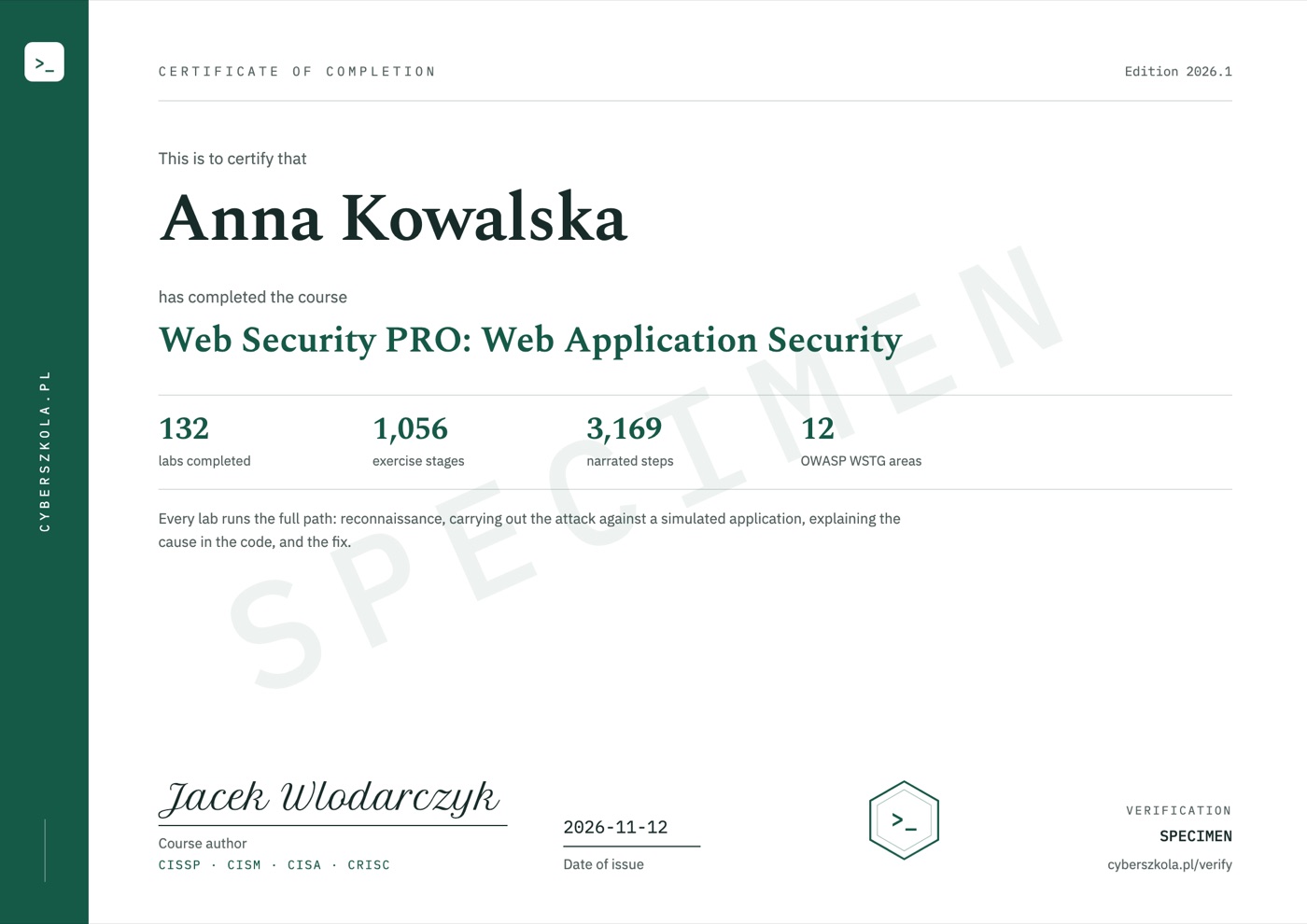
Certificate of completion
When you complete the course, the certificate is issued automatically and emailed to you. It shows your name, the date of issue and a unique code, and its second page lists the course scope.
Code verification: cyberszkola.pl/verify


Web Security PRO first edition
Planned first-edition price
Polish edition · Planned 12-month access
Notify me at launchJoining is free. Before sales open, you will receive the date, full scope and purchase terms. We are not taking payments today. Separate professional-practice modules and specialist courses are not included in this price.
For companies and teams
Compatible with LMS platforms including:
and other platforms that support e-learning standards.
Price for companies
Delivery into your company's own LMS from 50 licences.
Ask for a quoteWrite to [email protected]: the number of people, the courses you want and your LMS, if you use one.
Before joining
Start with the full UNION SQL injection demo. Inspect the request to view a product, the corresponding SQL query and its result. The tutor guides you through successive tests and verification of the fix. Then choose access-control, session and other injection labs. Basic familiarity with web applications and short SELECT queries will help, along with HTML and JavaScript for code examples.
Yes, on prepared applications and within the mechanisms available in each lab. Compare tests, explain the effect and explore variations. The course does not guarantee finding a flaw for a real client, employment or a bug bounty reward. Testing another party's application requires appropriate permission.
No. This edition focuses on technical vulnerability-testing practice. It does not include additional engagement-planning, full-reporting or CVSS modules, or an end-to-end pentest project. Web Security PRO is the course name; it does not imply inclusion of separate professional-practice modules.
No. You are buying a standalone technical course. Upcoming specialist courses, the risk course and AI SecLabs are separate offers. They are neither required purchases nor included in the first-edition price.
You pay for structured learning, an original environment and explanations of each action. The tutor and narration connect a test to its cause and result. You do not need to install your own lab. Try the free demo first to see whether this way of working suits you.
No. This is an upcoming course announcement and an interest list. Joining is not a purchase, a place reservation or a commitment to pay.
The launch date, price and access terms will be announced before sales open. The interest list is how we send that information.
The course is available in Polish and in English — you can switch language at any time, and lessons, exercise explanations and narration exist in both. Commands, code and tool names keep their original syntax, as used in everyday work.
No. All course exercises run in your browser on a computer with internet access. Training applications, terminals, editors and workshops are part of the platform. You do not install Docker, a virtual machine or a VPN, and you do not need paid external tools.
No. You work in an interactive environment. A virtual tutor highlights important elements, and narration explains the action and its result. Pause the lesson, return to earlier steps and run your own experiments. This guidance is built into the course, not individual consultation with a person.
No. You use training applications, simulators and prepared data. Learn the mechanism and its limitations in a safe environment. External resources are supplementary, not required to complete the exercises.
Yes, a certificate of completion. When you complete the course, you receive a certificate in English with a unique code that anyone can check at cyberszkola.pl/verify. It confirms completion of the course and is issued by the author; it is not an industry certification. We do not promise employment.
No. These are independently authored courses using public references and original cases. They do not replace licensed standards, accreditation or qualifications required in regulated industries.
Join the waitlist
Leave your email address. We will send you news of enrollment, the syllabus and first-edition terms. You will not need to keep checking this page.
Planned price: PLN 790 including tax